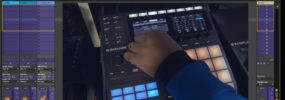
Maschine Quick Tip: loading default fx modules from the hardware

hardwarefx

Hey I got a quick tip for you from a question I received recently from a member. The question was how to load the blank fx modules directly from the Maschine controller. So if you don’t wish to load any of the factory presets, but say you want to load the factory reverb with a [...]

Using the Ableton Live 9 template with Maschine MK2

ableton9templatemaschinemk2

Hey what’s up MT Fam! I’m back with a follow up to the tutorial I put out on how to install the ableton live 9 maschine template with the exclusive tutorial I promisedĀ to show you how the template actually works In this tutorial I give you an overview of the features of the Maschine controller [...]

Maschine in Ableton Live 9: installing the new controller template

maschine_ableton_9

Hey what’s good fam! Just had a quick little public tutorial I made to show how to install the new controller templates for Ableton Live 9 I will follow up with an in depth tutorial that shows how the controller template works inside of Ableton exclusively for the MT Fam. Of course if you have [...]

Using the MASSIVE controller template in your DAW

massive_controller

Hey what’s up MT Family! Hope you’re good. Just wanted to share a quick tutorial in reference to a question I received on one of the Ableton tutorials, and the question was how to setup the Maschine controller template for MASSIVE so that the knobs control MASSIVE through the DAW. Now while this was a [...]

Maschine MK2 hardware controller overview

mk2overview

This is just a basic overview for those new to the Maschine MK2 controller. I’ve went over different aspects of the controller before but wanted to do a general overview of all the sections, buttons, knobs, etc. This quick tutorial will get you familiar with the hardware so you can dig in and get to [...]

Maschine Mikro: How to enable 16 level velocity pad mode

mikro16velocity

I had a question from a member on how to enable Maschine Mikro to play the same sound at different velocities across the pads. Basically this is called 16 velocity mode or “16 level” mode. It will take whatever sound you are currently on and spread it across all 16 pads with different velocities. Similar [...]

How to set high and low velocity response for a single pad

how-low-velocity

Hey what’s good MT family! Had a question from one of our members on how to setup the pads so that they respond to a specific high and low velocity. Now there isn’t a pad mode that does this in Maschine, you can do a fixed velocity but not a specific velocity range. However, in [...]

Map Maschine to trigger pads in Studio One Impact

s1impact_maschine

Hey so I had some questions about setting up the Maschine controller to play samples in Studio One’s Impact, and as I was putting it together I decided to break it out into separate videos. This tutorial will show you how to setup your own new basic template for triggering sounds in Impact. But I’m [...]

Maschine MK2: How to adjust the metronome level

mk2volume

This is a quick video tip I put out for the public on a recurring question I get, how to adjust the metronome level from the Maschine MK2 hardware. The process is somewhat similar to how you adjust it on the MK1 but there is a slight difference you have to make sure you are [...]

How to setup host transport control in Studio One V2

Hey what’s good fam! Just a quick tutorial on setting up the host transport control option in Studio One V2 This allows you to have control over the transport section of Studio One while still having your hardware controller dedicated to the Maschine plugin. As always, if you have any questions just let us know [...]

Controlling multiple instances of Maschine in your DAW

maschine_multiple_instances

Another question I get a lot when it comes to using Maschine in a DAW is how to get more outputs. Of course, that means simply loading more instances of the Maschine plugin. However, one thing that causes some confusion is how to actually control the different instances from your Maschine controller. In this tutorial [...]

How to start a new project from the hardware controller

new_maschine_project_from_hardware

Here’s a question I get from a lot of new Maschine users, how to load a new project from the hardware. I created a free tutorial to show exactly how to do this to share with the entire Maschine community. It’s a really simple process but can speed up your workflow tremendously if you like [...]

How to setup host transport control in Cubase

cubase_host_transport

Hey what’s good fam, just wanted to share a quick video on setting up the host transport control inside of Cubase. We already did videos for Ableton and Logic, but had some questions on a few others including Cubase so I wanted to get it knocked out for ya. The idea behind this setup, is [...]

Maschine MK2 – Volume, Swing, and Pitch quick adjust shortcuts

maschine_mk2_quick_adjust

A great feature of the Maschine hardware is quickly being able to hold a pad and adjust the volume, swing, or pitch/tune of it simply by turning a knob With the Maschine MK2 controller update, the three knobs used for this shortcut were replaced with a single large knob and 3 buttons. The quick adjust [...]

How to add new MIDI templates to Maschine with Controller Editor

controller-editor

Hey this is just a really quick tip for those new to using Maschine as a standard MIDI device. I get a lot of questions about how to add or create templates as well as how to open up the “controller” interface. In order to do this you need to open Controller Editor which is [...]

Maschine 1.8 – Using the new quick select and quick erase shortcuts

maschine_quick_select

Hey what’s good fam, back with another quick tip for you on the Maschine 1.8 update. There were a lot of smaller workflow improvements that I think many will enjoy. Two of those were the new quick select shortcut for events and the quick erase shortcut. Personally I really love the quick erase shortcut and [...]

Maschine 1.8 Tip – audition samples from the hardware

maschine-sample-audition

Hey what’s good fam, another quick tip from the new Maschine 1.8 software update You can now preview/audition your samples directly from the hardware, I want to show you my method of using it and a few tips in terms of how it works *access instantly when you join today!

Maschine Mikro – How to quickly change the pitch of a sample on a single pad

maschine mikro tuning a sample

Hey what’s good MT fam! Just wanted to share a quick tutorial with the Mikro users as I received this questions recently. This is a really quick video to show you how to do the “quick edit” of changing the pitch of a sample on a single pad. On the big Maschine controller it’s really [...]

Maschine Mikro – loading internal and plugin modules from the hardware

mikro loading modules from hardware

Yo what’s good fam, back with another quick tip for those of you using the Maschine Mikro I previously showed how to load plugin presets from the Mikro controller, but this time I wanted to show you how to load the internal and plugin instrument and fx modules from the controller. Sometimes you may not [...]

Adjusting hardware settings directly from the controller

adjust hardware preferences

Yo what’s good fam! This is just a quick tip to show you how to adjust the hardware controller settings directly from the controller. Many are aware you can adjust things like brightness, pad sensitivity, and screen contrast from the software preferences, but you can also do this directly from the Maschine controller. Sometimes you [...]

Maschine Mikro – adsr, oneshot, engine mode, and other sample playback options

mikro adsr oneshot and sample playback

Yo what’s good fam, got another Maschine Mikro tutorial for ya. This one shows how to navigate to the various sample playback and sample module options directly from the controller. There’s multiple ways to do this, including using the pads for quick navigation. Since the Mikro has one screen and one knob, NI had to [...]